

Alarms
Every TIS Tronic 260U alarm — sensor errors, HUW overheating, lack of fuel, failed fire-up, emergency temperature and STB overheating — with causes and how to clear them.
Alarms appear directly on the main screen and are indicated by a pulsing red LED on the right of the front panel. Press F to open the list of alarms that have occurred, UP / DOWN to scroll, and STOP to delete errors.
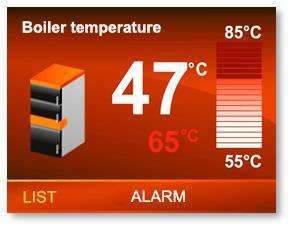
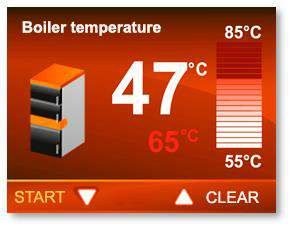
Alarm reference
| Alarm | What it means | What to check |
|---|---|---|
| Boiler temperature measurement error | The T1 sensor is missing or damaged | Sensor seated in the immersion well, wiring at T1, sensor continuity (KTY-81-210) |
| HUW overheating | The temperature in the hot water tank has exceeded 85 °C | HUW pump operation, tank sensor position on T2, HUW setpoint and temperature-increase value |
| Temperature measurement error, HUW | The T2 sensor is missing or damaged | Wiring at T2, sensor continuity |
| Exhaust gas temperature measurement error | The T3 sensor is missing or damaged | PT1000 fitted and wired to T3; the sensor is activated in the menu but not physically present is a common cause |
| Lack of fuel | The quenching condition has been met — the fire is out | Reload, then check fuel quality and the fuel shortage thresholds |
| Failed fireup | The time set in firing-up time expired without the boiler temperature rising above shutdown temperature + 2 °C | Draft, fuel moisture, fan operation, minimum fan speed, firing-up time setting |
| Exceeding the boiler emergency temperature threshold | Boiler temperature has exceeded 94 °C. The device switches to boiler protection mode | Pump operation, flow path, zone actuators, bypass, boiler cooling temperature setting |
| Overheating STB | The external safety thermostat has tripped. To clear, boiler temperature must fall below 60 °C | See below |
STB overheating in detail
The STB is an independent bimetallic sensor that cuts the fan when the water rises above roughly 90 °C. It is hardware — it acts whatever the software is doing.
Per PN-EN 303-5:2012, when the water temperature drops back to a safe value it is not possible for the fan to turn on by itself. Both of these must happen:
The water temperature in the boiler drops below 60 °C.
The error is manually reset on the control panel with STOP.
Common causes
| Cause | Fix |
|---|---|
| Pump failed or not running | Check Q3 output, pump power, and the 220 VAC relay for 120 V circulators |
| Every zone closed at once, no bypass | Fit a flow bypass |
| Pump start temperature set too high | MBtek value is 35 °C / 95 °F |
| Boiler cooling temperature set too high | MBtek value is 78 °C / 172 °F |
| Air lock in the boiler or distribution loop | Vent the system |
| Power outage during a burn | Expected behaviour — reload after it clears |
If you need the boiler to operate at a higher temperature, a DZT-2 thermal protection sensor opens at 200 °F / 95 °C instead of the DZT-1's 185 °F / 85 °C. Order from MBtek (Parts — UNI 15-40-60-95) and connect to I1.
Sensor fault diagnosis
A sensor alarm means missing or damaged — either the sensor itself or the wire.
Disconnect the controller from the mains.
Remove the top cover and check the connector at the relevant terminal. A correctly installed wire cannot be pulled out without pressing the terminal clip.
Check the sensor against its resistance/temperature curve. The boiler and HUW sensors are KTY-81-210; the exhaust sensor is a PT1000.
Replace the sensor if it is out of tolerance. Sensors have no polarity.
Replacement procedure and the terminal map are on Electrical and sensors.
Boiler sensor resistance reference
Use this to check a suspect CT4 boiler sensor with a multimeter.
| °C | °F | Typical Ω | °C | °F | Typical Ω |
|---|---|---|---|---|---|
| −20 | −4 | 1367 | 60 | 140 | 2597 |
| 0 | 32 | 1630 | 70 | 158 | 2785 |
| 20 | 68 | 1922 | 80 | 176 | 2980 |
| 25 | 77 | 2000 | 90 | 194 | 3182 |
| 30 | 86 | 2080 | 100 | 212 | 3392 |
| 40 | 104 | 2080 | 110 | 230 | 3607 |
| 50 | 122 | 2417 | 125 | 257 | 3915 |
The complete terminal map, sensor schedule and fuse specification.
Frequently asked questions
Quenching and fuel shortage
How the TIS Tronic 260U detects that the fire is out — by boiler temperature or exhaust gas temperature — and what it does with the fan and the central heating pump.
Wiring reference
Complete TIS Tronic 260U terminal map, sensor schedule, output ratings and fuse specification, with the board diagram and hydraulic connection drawing.